Saturday, April 20, 2013

Connecting to the Polar Personal Trainer Site

Connecting to the Polar Personal Trainer Site

A number of people have requested access to the comms code that I use in the Polar HRM Uploader tool I created.  Because of this, I've decided to write about the software here and offer it free for non-commercial use.  It's not a complete implementation, you will still need to write your own HRM readers and convert that to the Polar format, but the attached code should give you a good starting point.

The communications protocol has been reversed engineered by intercepting the communications between Polar's WebLink and the Polar Personal Trainer Site.  I used an intercepting proxy, called BurpProxy, that does a great job of displaying the content of HTTP traffic.  Luckily, the Polar protocol is in plain text so it makes it relatively straightforward to determine what is required.

Click here to download all the source files in one archive. The code is also on GitHub

The Communications Protocol

Uploading to the Polar Site is a three stage process:
  1. Login.  This stage requires that you authenticate with the Polar site using a basic-auth method.  You can see an example of the login handshake here.
  2. Upload the timestamps of HRM files.  The Polar site will then validate the files and return a response which indicates which files have already been uploaded.  You can see an example of the timestamp handshake here.
  3. Upload the files.  The files are uploaded using a simple XML format.  You can see an example of uploading files here.

XML Marshalling

Since we need to convert from Java to XML, we use an XML data binding library called Castor.  Java has come along way since I originally wrote this code and you can now use Java's JAXB reference implementation to do something similar.

There's a number of good examples on the Castor site that shows how to use the libraries.

Click the link to get the Castor mapping file that I've used.

The code below shows a snippet of the XML format used by Polar.

 <wristunit-data>  
     <prop name="subModel">166</prop>  
     <prop name="version">2</prop>  
     <object name="userSettings">  
         <prop name="maxhr">186</prop>  
         <prop name="resthr">50</prop>  
     </object>  
     <collection name="Exercises">  
         <item type="Exercise">  
             <prop name="origin">1</prop>  
             <prop name="time">2011-08-22 17:39:52.000</prop>  
             <prop name="save">True</prop>  
             <object name="mode">  
                 <prop name="speed">True</prop>  
                 <prop name="cadence">True</prop>  
             </object>  
 ...              
   

We represent each element with a Java object:
  • Property.  These are the core elements on the Polar message that describe a name and value.  They have an optional type.
  • Item. An Item is a collection of Polar objects and it has a Type and an optional Index.
  • Collection.  A named list of Items, e.g. exercises.
  • Polar Object.  A named collection of Properties.
  • Wrist Unit Data. A wrapper object for the message.
  • Webservice.  A wrapper object for the Polar response.
You can download these files by clicking on the links or view them on GitHub.

Communications Code

The communications code is based upon standard Java HTTPUrlConnection and is contained in the class PolarSiteConnection.  This contains simple methods for connecting to the Polar site, sending data and parsing the response.

It encapsulates the Castor data binding too, which is adequate for my project but not generic enough as there's no easy means of implementing an alternative library without some refactoring of the code.

Here's a simple example of how to use the code to login:

 private void processLogin() {  
         // Update the status on the main dialog.  
         controlledFrame.setStatusMessage("Logging into Polar website...");  
         // Get the dialog credentials and try to connect.  
         String username = loginDialog.getUsername();  
         String password = loginDialog.getPassword();  
         System.out.println("Site connection is: " + siteConn);  
         // Pass these to the connection class.  
 ****  
         Webservice ws = siteConn.intiateConnection(username, password);  
 ****  
         if (ws == null) {  
             controlledFrame.setStatusMessage("Cannot connect to Polar site");  
         } else {  
             Status s = ws.getStatus();  
             if (s.isOK()) {  
                 userPreferences = ws.getUserPreferences();  
                 controlledFrame  
                         .setStatusMessage("Logged into Polar website as user "  
                                 + userPreferences.getFirstName() + " "  
                                 + userPreferences.getLastName());  
                 setAppState(AppState.LOGGED_IN);  
             } else {  
                 controlledFrame  
                         .setStatusMessage("Cannot log into the Polar website.");  
             }  
         }  
     }  

Note that the variable siteConn is an instance of PolarSiteConnection. The lines wrapped in **** are the interesting bits that send data to Polar.

PolarSiteConnection also uses a library to convert the password to Base64 as part of the Basic-Auth authentication.  You'll need to source your own copy of this as the licensing around the one I use prevents me from distributing it.


Thursday, November 03, 2011

Uploading Old Polar HRM Data to the Polar Personal Trainer Website

(Update 22nd April 2014: Newer version of the HRMUploader jar fixes an issue with HRZones if there are more than five defined in the HRM file)

I'm a keen cyclist and have used a Heart Rate Monitor of various descriptions for a number of years. I've religiously downloaded this data onto the PC and stored it in the various applications that come with the monitor. Not that I do anything with it, though I did get part way through writing an application to store the data in a relational database and then display multiple rides overlaid on one another for visual comparison. Anyway, I digress.

More recently I've bought Polar HRMs, they are great products with useful features for cycling. Years ago I wrote a Java application that converted the 'other' HRM files to the Polar format, so that all rides and associated HRM data could be shown in the latest Polar application on the PC.

Polar have caught onto the web, and have launched a site that allows you to transfer your data from the HRM to the web. Great for current stuff, but what about all those old files I have? In their wisdom, Polar have not released a tool that allows me to upload the data I've got on my PC.

There are a few people around who would, like me, prefer to have all their data on the web, and want to upload their old data. Being a professional Java developer, I thought it would be a doddle to create a Java Application that interfaced with the Polar web site and allowed me to transfer my data. And, in general, it was. So here is a Java application that does this. It's a little crude, but does the job.

Just run it with:

java -jar HRMUploader.jar


Enter your Polar Personal Trainer userid and password. If you log in successfully, then you will see your name in the lower status pane.

Browse to your polar .hrm files and select one or more (try it with one first :) ) The application will check the site to see if it's already uploaded a file for this date. If it has, it will put a check mark against the file, if it hasn't then use the upload button to upload the file. It won't upload a file that is already on the site, you will have to delete it from the site if you want to resend it.

There are no guarantees that this will work for you. Might be worth opening another 'test' account on the Polar site and trying it out there first. Whilst you can select many files to upload at once, it might be worth limiting it to 10 or so at a time - the Polar site might choke on too many. I just tried it with about 70 and it took a while, but seemed to work.

Regarding calories expended.

This value is read from the associated PDD file and needs to be in the same directory as your HRM file.  There's one PDD file for each day, so you could have many HRM files that reference the same PDD if you do multiple exercises per day.  In these cases, you are unlikely to be able to read the PDD as it will not have the same name as the HRM file.  Unfortunately, when I originally wrote the HRMUploader, I didn't realise I needed to read the PDD too.  Ideally I need to change the application to read the PDD first,  since this contains all the HRM file names.  However, I'm not planning to do this any time soon, sorry.

Altitude data

Altitude data is sent to the Polar site in 'feet'.  This means that if you are using meters in your HRM file, then the conversion to and from feet could result in a rounding error.

Furthermore, I seem to recall a bug in the HRM files that stores altitude as feet, even though the file is supposed to be metric.  Send me a HRM file example if you suspect the altitude is being uploaded incorrectly.

Here's the code to interface with the Polar site

At some point I'd like to host this on the Google Java App Server, but they've done some funny stuff with Java and restricted various classes in the default 'JRE'. It means that some stuff which should work under Java's WORA mantra doesn't.

The application uses various libraries from Apache, Google and Castor. All their respective rights are recognised. The software is supplied 'as-is' and you use it at your own risk. You did back that data up, right?

Saturday, February 12, 2011

Tune Announcer - Scrobble Links

Noticed with the latest Songbird release for Android they support multiple Scrobble clients but broadcast them ALL!

Whilst it's probably a bug, as no other player does this, I've modified Tune Announcer to let the user select which ones to receive.  Mainly because I want to use Songbird.

However, it took me a while to find which scrobble broadcasts did what (note to self: Code comments are useful), so here is a list of the scrobble sites:

There's also the default clients (Android and HTC),no info on these other than they broadcast the following:

<action android:name="com.android.music.playstatechanged" />
<action android:name="com.android.music.metachanged" />
<action android:name="com.htc.music.metachanged" />
<action android:name="com.htc.music.playbackcomplete" />
<action android:name="com.htc.music.playstatechanged" />

They are very similar to the others in content.


Sunday, January 30, 2011

Gestures Download File

Users of Contact Lookup can create their own gestures file.  See this blog post for more details.

To get the pre-built file, then click this link.


(Apologies for bouncing you from one blog to another, but this blog has analytics so I can track how much interest there is in gestures).

Tuesday, December 28, 2010

Customising Google Search

Spam Sites in Search

How many times have you clicked on a Google search result only to be presented with a spam site that just wraps other site content with ads?  I find technical searches on Google are littered with this dross.  It's pissed me off enough to look at using Bing and Bing is far better at hiding this crap from the search list.

I tried this chrome extension, and whilst the idea is sound, it doesn't work particularly well with instant search.

However, there is another option.  Use a customised Google Search Site.  You can read more here on how to set this up.  Whilst the screen looks very basic, it does work at removing dross sites, although you do need to manually blacklist each one 'as you find it'.

You can even link this into chrome to be the default search engine.  You'll need to tweak a few things in the URL to get it to work, specifically adding %s to indicate where the search terms need to go.  Want dated searches?  Add &tbs=qdr:y to get results in the last year and add the date select to your searches.

So finally, I have a Google search that can filter out those spastic sites.

Wednesday, December 15, 2010

Moving to WordPress

The Android posts have moved over to WordPress, mainly to keep the development off the personal blog, but also because WordPress is so much better at editing complicated pages with images.  Blogger seems to have been dumbed down :-(

I might see how the Google Sites stuff works, as I need some better control over the CSS - oh, wait, they don't allow that either :-(

Contact Search Updated

Works with OS 1.6 devices

The latest changes to Contact Search have been around the Database access classes to allow 1.6 devices to work.

For OS2.0, Google improved the framework around data access for Contacts and these are not compatible with 1.6.  It was a large piece of work to write the 1.6 data access code and refactor the contact searching to be able to run both.

Coming to the Market near you soon ;-)

Tuesday, December 14, 2010

Contact Search Updated

Contact Search has been updated to v1.1.0

This version

  • has options to select a simple search, or a multi-word search.
  • can configure the categories you want to search, such as name and address only. 
  • now prompts you the first time you install to set the search settings.

Tuesday, November 30, 2010

Contact Search v1.1.0


THIS POST IS NO LONGER BEING UPDATED

CLICK HERE TO SEE THE REPLACEMENT BLOG

Contact Search

Contact search works with the standard Google search facility on your Android handset to do a complete search of your contacts.

Whilst the Android OS includes a native contacts search it is, surprisingly for a search company, very limited. If you try search for part of a phone number or address it will not find it.

Contact search, however, will find it. It will search through all the contact fields to find a match for the entry you input.

Be sure to read the following, as there is useful information on getting the best out of the search process.


Installation

Install Contact Search as you would any other application from the Android market.

As of v1.1.0 it will prompt you to configure the global search settings, and direct you straight to step 3), below.  If you decide not to set the settings at installation, then you can still follow these instructions to add contact search as a global search provider.


To use contact search, you need to enable it from the search menu. Follow these steps:


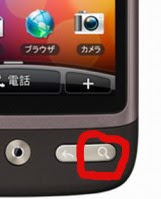
1. From the home screen, press the 'search' button.


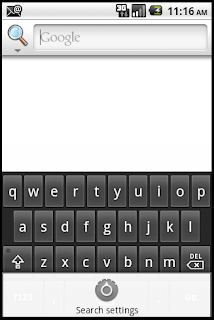
2. From the search screen, press the 'menu' button and select the 'Search Settings' menu.


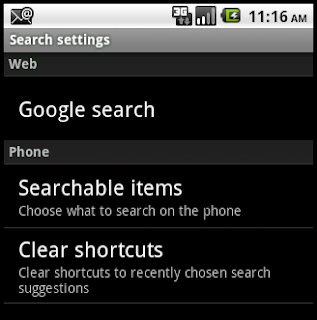
3. From the search settings, select the 'Searchable Items' option.


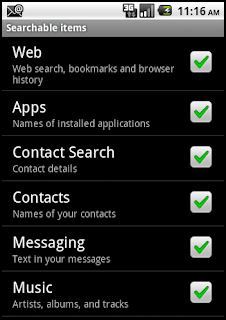
4. From the searchable items, ensure that 'Contact Search' is selected.

5. You can now enter contact search information, and find it!


Search modes

There are two search modes:

Simple search

The phrase entered is searched for in each of the contacts field exactly as written.  For example, if you search for 'Curly Wurly' then it will only find contacts that have 'Curly Wurly' in them.  (Probably not many, unless you work at Cadburys.)

Multi-word search (OR)

This search mode will look for contacts that have any of the phrases in them.  For eample, if you search for 'Curly Wurly' if will find all contacts that have 'Curly' OR 'Wurly'  in them.  (Now you'll find Cadburys and hairdressers.)


Search tips

The search ranking that Google uses on the Android handset means that Contact Searches may not show up in a basic search. See the end of this page for details on the ranking process .

To ensure that contact details are searched for follow the tips below:

  • Search only on contact details by clicking the search icon and selecting the Contact Search icon.
  • Reduce the number of contacts found by searching on full names or numbers
  • (v1.1.0) Simple search is slightly quicker than the multi-word search.
  • (v1.1.0) Reduce the number of search categories.  If you have not notes, then exclude this from the search.  you can always add it back again later.


Improvements

Here are some things I intend to implement to improve the search process:
  • Ability to have multiple search items, such as name and postcode.  Sort of done in v1.1.0 in that you can enter multiple search terms (currently OR based, but will be AND based too, later).
  • Use the pictures from contacts as icons in the search list, where applicable
  • Regular expression searching
  • Multi-word AND search, so it will find contacts with all phrases in a particular contact field
  • Multi-word searches that work across contact fields.  For example, a contact name and part of a number.  These are in different fields and could help narrow the search even more.
  • Searching for specific words across fields.  Might be implemented as an advanced search form.
  • Search within results to narrow down a search.

Search Performance

On an HTC Desire with Android OS2.2 I can search 250+ contacts in around 1.5 0.6 seconds.  The application now writes a small log file to the system log, so you can see and report this if you think it takes too long.

There is a free application called 'aLogCat' by Jefrey Blattman that can read the log files.  To check the log file, run a search, open aLogCat, press Menu->More->Bottom and look for a FullSearch log message like:

Found 34 records out of 2799 raw entries in 665ms

(Yikes, my 250 contacts are stored as 3K records!)

Changelog

  • 20101214 v1.1.0 New menu options to control the search more.  Can be used as a stand alone application.
  • 20101206 v1.0.3 Performance improvements to reduce number of records searched.
  • 20101205 v1.0.2 Added stats to logging.
  • 20101130 v1.0.1 Case insensitive search, thanks to Gint for the suggestion
  • 20101130 v1.0 Initial version

Friday, November 19, 2010

Thursday, November 11, 2010

Tune Announcer Pro Released

A 'pro' version of Tune Announcer is released. See here for further details.

Saturday, September 18, 2010

Parallels 6 -> Parallels 5

Uninstalled this pile of shite and gone back to version 5.

In all my years of software upgrading I think this is the first time I've ever regressed a version. I can put up with some dodgy functionality, but when it's FUBAR, no, I'll regress.


Bug Report 1

Bug Report 2

Google Search

Friday, September 17, 2010

Parallels 6

The parallels forums are just full of people complaining about BSOD with Windows under Parallels.

Whilst I'm glad that it's not just me, it's shows the shoddy software that the company has release yet again.

Saturday, September 11, 2010

Parallels 6

Don't bother, usual story, new release, buggy as hell, windows crash, BSOD.

Sorely disappointed.

Er, no it doesn't

Friday, September 03, 2010

Android Tune Announcer v1.0


THIS POST IS NO LONGER BEING UPDATED

CLICK HERE TO SEE THE REPLACEMENT BLOG
Tune Announcer

Description

This is a simple Android application that announces the name and artist of the song currently being played. It's useful if you have a large music collection and cannot see the screen to check the names, e.g whilst exercising.

It uses the native Text-to-Speech capabilities of the device to speak.
Example: The application will speak "Now playing 'Firestarter' by 'The Prodigy'"

Pro Version

The 'pro' version is a paid for version that offers the same speaking functionality, but adds the following:
  • Notification icon. When enabled and music is playing, Tune Announcer will show an Icon in the notification section of the phone. If you select this, it will put you directly into the configuration screen.
  • Toggle widget. This is an on-screen widget that allows you to toggle the enabled status of Tune Announcer with a single touch. The widget indicates the status by showing the icon's note as green for enabled and red for disabled. This is useful if you want a quick way of enabling or disabling Tune Announcer.
  • No adverts on the configuration screen
  • A new 'pro' icon, woot!

Since the speaking functionality is the same in both versions, try the lite version first to ensure that it works with your preferred music player. If it does, and you like it, then feel free to buy the 'pro' version.

Volumes - Updated for v1.1

The application speaks the text using the system volume and optionally mutes the music whilst speaking.

The speech volume is now set relative to the current music volume. This can be adjusted using the slider from -50% (quieter than the music) to +50% (louder than the music).

Also, the music volume can be muted whilst speaking, again using a slider. The muted volume can go from -100% (no music) to 0% (no change in the music volume).

Hopefully these options now cover all the niggles that people were having and my pet bug-bear of forgetting to change the speech volume when wearing headphones and having Tune Announcer shout at me ;-)

Non-standard Media Players and Scrobbler Support

If you are using a non-standard media player i.e. not the Android or HTC players, then adding support is difficult. However, there is a simple workaround if *your* media player supports last.fm scrobbling as these must broadcast Intents to the main scrobblers. As of v0.5, Tune Announcer supports the Android Simple Last.fm Scrobbler and ScrobbleDroid. If you enable one of these in your media player, then Tune Announcer will work :)

Speech Pitch and Speed

v0.6 adds the ability to change the pitch and speed of speech using a couple of sliders on the configuration screen. The intent was to make the speech less, well, android like. Whilst this works well programatically, the results are less than impressive. Changing the pitch alters the voice from heavy smoker to hysterical. The speed changes from v.e.r.y.s.l.o.w to clipped. There doesn't appear to be any way to change the apparent sex of the speaker, it's female or nothing.

If the speed slider isn't working for you, then make sure you have not overridden the settings in the main Text-To-Speech configuration screen in your Android settings.

Things to do:
  • Shake to speak. This would only be really useful if it works with the device sleeping
  • User selectable MP3 tag elements to speak, such as album, track length, etc
  • Announce the song just played when a new one starts
  • Announce the song details after a specified % of the song has been played
  • Specify the speech volume as a percentage of the current media volume. This is useful if you change the media volume for different environments and don't want to keep changing the speech volume in Tune Announcer too. (Done in v1.1)
  • A widget to toggle the enabled status of this app. Useful if you don't want it announcing all the time (I only need it when cycling) (Done in the 'pro' version)
  • See if I can link in with last.fm scrobble data, so that this works with any music app that supports last.fm (Done in v0.5)
  • Pause the track (or adjust the volume) when speaking (Done in v0.3)
  • Allow the user to change the text for "Now playing" and "by". Simple localisation :) (Done in v0.3)
  • Allow the user to select the pitch and speed of speech (Done in v0.6)
  • Option to change the system volume from the configuration screen (Done in v0.7)
Download

Pick it up here from appbrain or use the QR barcode below.


The pro-version can be found here from appbrain or use the QR barcode below.


FAQs

Q. Why does it sound so bad?
A. Sounds OK to me, but the Text-to-Speech library is provided by Google and not me. I can't change how it sounds :-) Try it in French, that language always sounds good.

Q. It seems a little slow to speak, why is that?
A1. On my HTC Desire, it can take a second or two to initialise the Text-to-Speech library. On a device with little free memory, or a slower processor, then it may take longer. The next time it speaks it should be quicker, unless the OS has swapped out the Text-to-Speech libraries again :(
A2. When using scrobble support to initiate the speech, Tune Announcer has to wait for the event to be sent from the music player. Some players, such as MixZing, send a delayed scrobble event. If you suspect that this is the problem, then perhaps you can kindly request the developer to initiate scrobble events earlier. (You can test this theory by pressing pause/play after speaking, if the speech is delayed then it's most likely due to a slow scrobble event).

Contact

If you have any questions about Tune Announcer, or suggestions for additional functionality, then please contact me, either by this blog or via email to Tune.Announcer at softwyer.com

Donating

PayPal doesn't really support solicited donations for products, so if you like it, then buy the 'pro' version.

Changelog
  • v1.1 2010-11-12 Changes to the way volumes are set, see above
  • v1.0 2010-11-11 Release of pro-version. Some bug fixes and code realignment to support this.
  • v0.7.2 2010-11-03 Bug fix: Speaks unknown when the artist or title not defined.
  • v0.7 2010-09-13 Enable user to configure the spoken volume.
  • v0.6 2010-09-09 Enable user to configure the speed and pitch of speech
  • v0.5 2010-09-08 Add support for ScrobbleDroid
  • v0.4.6 2010-09-08
    • Fixed regression with enable/disable in preferences
    • The service now exits after speaking rather than running all the time
    • Fixed problem when speaking for the first time when the Text-To-Speech engine had not initialised
  • v0.4 2010-09-07 Added support for the Android Simple Last.fm Scrobbler.
  • v0.3.1 2010-09-06 Fix some issues around saving preferences. The soft keys don't generate key-down events like they do in the emulator *#?#. Use the view onPause method to save all preferences to avoid this.
  • v0.3 2010-09-06
    • Mute the audio sound when speaking - note that this doesn't stop playback.
    • Can now change the spoken prefix.
    • Can selectively disable speaking the artist and track.
  • v0.2 Changed icons and added ads (sorry ;-)
  • v0.1 Initial version

Thursday, May 06, 2010

Prague Trip

Here's a map of the Prague trip we went on. I intend to write up the day's events later on, but this is a good taster. 11/11/2010 Since I haven't done it by now, then it isn't going to happen!


View Prague Trip in a larger map

Wednesday, February 10, 2010

Time Widget for Windows


Annoyed that the Windows task bar time widget is pretty useless, unless you expand it to show multiple rows? The try Ryan's Time Thingy, a useful time widget that can be configured how you like it.

Wednesday, October 14, 2009

Wavey Davey


Cool, just got accepted into the Google Wave beta. As with Gmail, they give users the ability to invite other users. I have a few invites left, if you'd like one then leave a comment. The invites will be distributed on a first-come first-served basis. Good luck.

Sunday, September 06, 2009

GAE Revisted

Since I'm not gaming at the moment, see previous post, had another go getting the Polar Uploader to work, but still suffering with the same SimpleDateFormat problem that I described here.

Shaiya

Been playing Shaiya from Aeria games over the past few months. It's quite a good Fantasy MMO and I can spend a few hours over the weekend playing it.

However, this weekend the servers are suffering massive lag and disconnect problems. Aeria are blaming it interest generated by the PAX event that they are involved with. Doesn't quite ring true to me, as how does an event with a few thousand people cause issues for an MMO game that can host hundreds of thousands? But what do I know ;)